This would affect any user who pressed close or cancel during set up. So not everyone, but likely many users. We don’t have any reports of the issue before the original post from August 25th so we can assume the issue started around that date.
Thanks for your suggestions. Can you please link the “webz.chainsafe.dev” page you are referring to? And yes, I agree there need to be more instructions in the UI. We will prioritize adding those next week.
Ahh understood, thanks. We’ll get that text updated and look into this further next week. If you don’t think you closed or cancelled anything, we’ll look into that further as well.
Hi @Edicksonjga, since the fix, no one else has reported this issue. Let me share the GH issue you created with our dev team and see if they can resolve this asap.
Thanks for sharing that. I think I’ll have to reschedule tomorrow’s activity on Snap until the bug is fixed.
I know you say you’ll send the problem to the developers, but I also left a comment on GitHub almost three weeks ago and haven’t gotten a response either. @ColinSchwarz
I have the version mentioned as new 8 hours ago on GitHub (0.2.6) and the bug is still there. I have uninstalled and reinstalled it, but there is no solution.
Hi folks, we are still trying to reproduce this issue. One lead dev has made a response on the GH issue that was opened regarding this, requesting more information. If you have any other context you can share, or have an answer to his question, please comment on the GH issue.
We have also identified another option that might work on your end:
In Chrome or Brave: Clean IDB where wallet is stored and try again,
(There is an issue with firefox permissions and storing wallet data in IDB.)
remove snap from metamask as before
delete wallet from IDB.
Open developer tools → Application → IndexedDB → keyval-store - Delete database
then refresh, wait 3 seconds* and install snap
(*issue might come from wallet not initializing fast enough as snap is installed)
A few months ago I had the same problem when logging into Snap.
I managed to solve it by following these steps.
1 - Disconnect Snap from Metamask.
2 - Press F5 on the browser page.
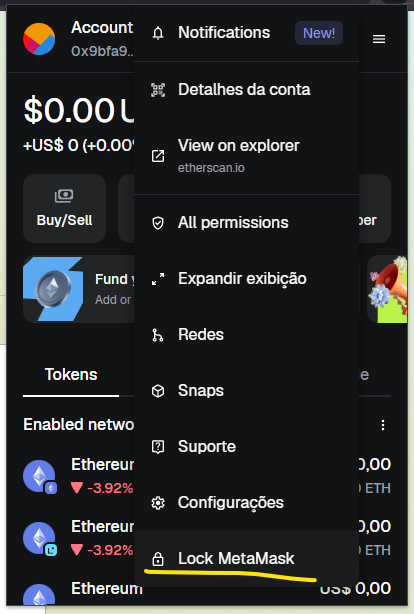
3 - Lock Metamask.
4 - Log in to Metamask again.
5 - Request to connect to Snap again.
After these steps, Snap opened in all the browsers that had problems.
But one curious thing: the funds in these wallets disappeared, even though they had the same address… I thought it was strange, but I didn’t lose even $1.00.
I deposited funds to the WebZjs metamask Snap, shielded it, came back a day later and saw new funds in my t address that I did not deposit. It was the same amount that had been shielded so effectively my account balance doubled. I tried to shield and that did not work.
Then the web wallet would not connect to metamask. I got an error message. I refreshed my browser. I reconnected to metamask. My balance is now zero. Please tell me that my funds are not lost.**
Hi everyone, I’m happy to report that this start up bug should now be fully resolved on all browsers, even Firefox. If you are still getting a connecting error on the home page, there will now be an error report and instructions to delete local wallet and snap and then to start clean.