Ya, I build custom PC’s, mostly liquid cooled. You can build a monster for $5k. Out of all my purchases the one that still haunts me was one of the first Geforce cards. I don’t remember the number, but is was well over $600 and the chip fan was like what you see on a mobo cooling something like a z77 chip. That Geforce was the absolute shit at the time, but DAYUM when you look at things today it makes me want to cry.
Well my parents did after I upgraded their pc. I started out on an IBM ps/1 in third grade and then the Aptiva where i first got my hands on 3.1. I can run around Linux enough to do basic things but I don’t like the GUI on most version. Call it a preference but I don’t pay for windows either so I’m ok with it. Bloatware and tracking and data collection are easy enough to get rid of if you’re comfortable editing the registry so it ultimately comes down to comfort and I prefer Windows as I’m sure a lot of others do as well.
I use dos to mine from, with Norton commander  . all you linux and windows noobs
4 Likes
Ever use BeOS? I liked that OS. Hated they stopped dev’n it.
1 Like
Tell me how you remove tracking and data collection? =D yeahhh you don’t really but I’d be glad to hear you explanation
this may help = https://github.com/Nummer/Destroy-Windows-10-Spying
+turn off all the switches you find + disable/remove all apps & services + no registrations of any kind+ no auto updates + Group Policy tweaks + behave 
Wanna try to make someone look stupid again?
yup, thats how I spend 5000$ on a pc custom loops
yeah sure you can clean it up, just takes 20 minutes…
but actually im more happy today in the arch based baby distros like antergos or manjaros (like im in now) kde plasma is really nice
For the tracking it’s a little esier.
yeah winaero is a great site with load sof helpful tips and scripts
sc delete is my best friend in windows 10
ok i should probably really get some sleep, ive been up for a good 36 hours now… but im not even tired
damn claymore . i was supposed to fall asleep and then he comes out and says “im releasing in a few hours”
stayed up and it wasnt even better than what I was currently using…
1 Like
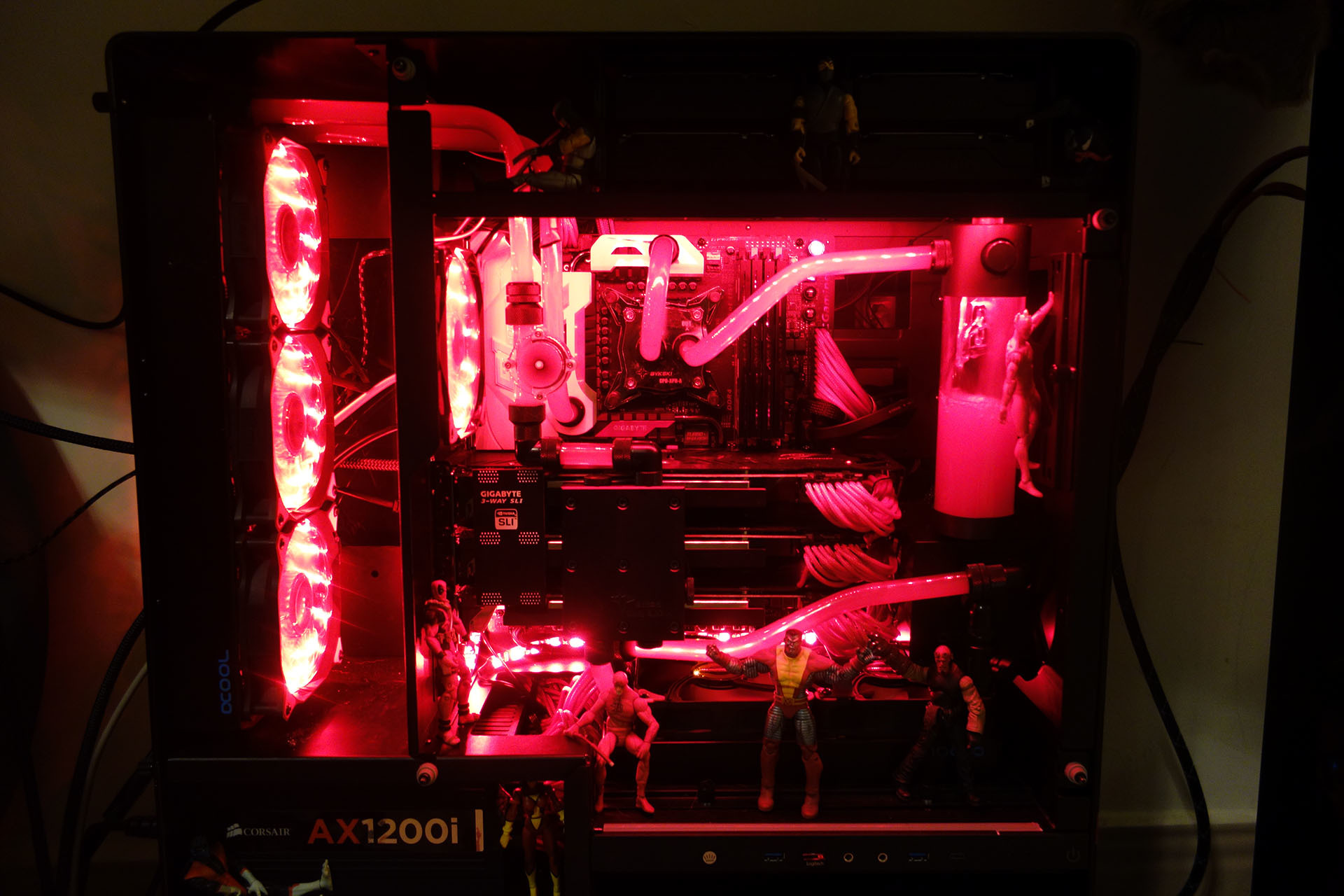

Honestly I haven’t messed with any Linux OS besides Ubuntu and centOS. I’m sure I could find one that completely suited my needs but I’m not one for trial and error. I’m comfortable in Windows but I totally understand the allure of Linux. Totally a preference.
Save as a .bat
@echo off
cls

echo This Script will do the following:
echo Disable Data Logging Services
echo Configure Windows Explorer
echo Uninstall Onedrive
echo Edit the Hosts file to block sending Telemetry Data to Microsoft
echo.
echo press any key to continue...
pause > NUL

echo Checking for Administrator elevation...
echo.
openfiles > NUL 2>&1
if %errorlevel%==0 (
	echo Elevation found! Proceeding...
) else (
	echo You are not running as Administrator...
	echo This batch cannot do it's job without elevation!
	echo.
	echo Right-click and select ^'Run as Administrator^' and try again...
	echo.
	echo Press any key to exit...
	pause > NUL
	exit
)

echo.
echo Disabling Data Logging Services

sc config diagtrack start=disabled
sc config dmwappushservice start=disabled
sc config RetailDemo start=disabled
reg add "HKEY_LOCAL_MACHINE\SOFTWARE\Microsoft\Windows\CurrentVersion\Policies\DataCollection" /v AllowTelemetry /t REG_DWORD /d 0 /f > NUL 2>&1
reg add "HKEY_LOCAL_MACHINE\SOFTWARE\Wow6432Node\Microsoft\Windows\CurrentVersion\Policies\DataCollection" /v AllowTelemetry /t REG_DWORD /d 0 /f > NUL 2>&1
schtasks /change /TN "\Microsoft\Windows\Application Experience\Microsoft Compatibility Appraiser" /DISABLE
schtasks /change /TN "\Microsoft\Windows\Application Experience\ProgramDataUpdater" /DISABLE
schtasks /change /TN "\Microsoft\Windows\Customer Experience Improvement Program\Consolidator" /DISABLE
schtasks /change /TN "\Microsoft\Windows\Customer Experience Improvement Program\KernelCeipTask" /DISABLE
schtasks /change /TN "\Microsoft\Windows\Customer Experience Improvement Program\UsbCeip" /DISABLE
echo "" > C:\ProgramData\Microsoft\Diagnosis\ETLLogs\AutoLogger\AutoLogger-Diagtrack-Listener.etl

echo.
echo Removing all Folders from MyPC
REG DELETE "HKEY_LOCAL_MACHINE\SOFTWARE\Microsoft\Windows\CurrentVersion\Explorer\MyComputer\NameSpace\{088e3905-0323-4b02-9826-5d99428e115f}" /f > NUL 2>&1
REG DELETE "HKEY_LOCAL_MACHINE\SOFTWARE\Microsoft\Windows\CurrentVersion\Explorer\MyComputer\NameSpace\{1CF1260C-4DD0-4ebb-811F-33C572699FDE}" /f > NUL 2>&1
REG DELETE "HKEY_LOCAL_MACHINE\SOFTWARE\Microsoft\Windows\CurrentVersion\Explorer\MyComputer\NameSpace\{24ad3ad4-a569-4530-98e1-ab02f9417aa8}" /f > NUL 2>&1
REG DELETE "HKEY_LOCAL_MACHINE\SOFTWARE\Microsoft\Windows\CurrentVersion\Explorer\MyComputer\NameSpace\{374DE290-123F-4565-9164-39C4925E467B}" /f > NUL 2>&1
REG DELETE "HKEY_LOCAL_MACHINE\SOFTWARE\Microsoft\Windows\CurrentVersion\Explorer\MyComputer\NameSpace\{3ADD1653-EB32-4cb0-BBD7-DFA0ABB5ACCA}" /f > NUL 2>&1
REG DELETE "HKEY_LOCAL_MACHINE\SOFTWARE\Microsoft\Windows\CurrentVersion\Explorer\MyComputer\NameSpace\{3dfdf296-dbec-4fb4-81d1-6a3438bcf4de}" /f > NUL 2>&1
REG DELETE "HKEY_LOCAL_MACHINE\SOFTWARE\Microsoft\Windows\CurrentVersion\Explorer\MyComputer\NameSpace\{A0953C92-50DC-43bf-BE83-3742FED03C9C}" /f > NUL 2>&1
REG DELETE "HKEY_LOCAL_MACHINE\SOFTWARE\Microsoft\Windows\CurrentVersion\Explorer\MyComputer\NameSpace\{A8CDFF1C-4878-43be-B5FD-F8091C1C60D0}" /f > NUL 2>&1
REG DELETE "HKEY_LOCAL_MACHINE\SOFTWARE\Microsoft\Windows\CurrentVersion\Explorer\MyComputer\NameSpace\{B4BFCC3A-DB2C-424C-B029-7FE99A87C641}" /f > NUL 2>&1
REG DELETE "HKEY_LOCAL_MACHINE\SOFTWARE\Microsoft\Windows\CurrentVersion\Explorer\MyComputer\NameSpace\{d3162b92-9365-467a-956b-92703aca08af}" /f > NUL 2>&1
REG DELETE "HKEY_LOCAL_MACHINE\SOFTWARE\Microsoft\Windows\CurrentVersion\Explorer\MyComputer\NameSpace\{f86fa3ab-70d2-4fc7-9c99-fcbf05467f3a}" /f > NUL 2>&1

echo.
echo Setup Windows Explorer View
REG ADD "HKEY_CURRENT_USER\SOFTWARE\Microsoft\Windows\CurrentVersion\Explorer\Advanced" /v LaunchTo /t REG_DWORD /d 1 /f > NUL 2>&1
REG ADD "HKEY_CURRENT_USER\SOFTWARE\Microsoft\Windows\CurrentVersion\Explorer\Advanced" /v HideFileExt /t REG_DWORD /d 0 /f > NUL 2>&1
REG ADD "HKEY_CURRENT_USER\SOFTWARE\Microsoft\Windows\CurrentVersion\Explorer\Advanced" /v Hidden /t REG_DWORD /d 1 /f > NUL 2>&1
REG DELETE "HKEY_CLASSES_ROOT\CABFolder\CLSID" /f > NUL 2>&1
REG DELETE "HKEY_CLASSES_ROOT\SystemFileAssociations\.cab\CLSID" /f > NUL 2>&1
REG DELETE "HKEY_CLASSES_ROOT\CompressedFolder\CLSID" /f > NUL 2>&1
REG DELETE "HKEY_CLASSES_ROOT\SystemFileAssociations\.zip\CLSID" /f > NUL 2>&1

echo.
echo Uninstalling OneDrive

set x86="%SYSTEMROOT%\System32\OneDriveSetup.exe"
set x64="%SYSTEMROOT%\SysWOW64\OneDriveSetup.exe"

taskkill /f /im OneDrive.exe > NUL 2>&1
ping 127.0.0.1 -n 5 > NUL 2>&1

if exist %x64% (
%x64% /uninstall
) else (
%x86% /uninstall
)
ping 127.0.0.1 -n 8 > NUL 2>&1

rd "%USERPROFILE%\OneDrive" /Q /S > NUL 2>&1
rd "C:\OneDriveTemp" /Q /S > NUL 2>&1
rd "%LOCALAPPDATA%\Microsoft\OneDrive" /Q /S > NUL 2>&1
rd "%PROGRAMDATA%\Microsoft OneDrive" /Q /S > NUL 2>&1

echo.
echo Removeing OneDrive from the Explorer Side Panel.
REG DELETE "HKEY_CLASSES_ROOT\CLSID\{018D5C66-4533-4307-9B53-224DE2ED1FE6}" /f > NUL 2>&1
REG DELETE "HKEY_CLASSES_ROOT\Wow6432Node\CLSID\{018D5C66-4533-4307-9B53-224DE2ED1FE6}" /f > NUL 2>&1

echo.
echo Editing Hosts File

SET NEWLINE=^& echo.

FIND /C /I "telemetry.microsoft.com" %WINDIR%\system32\drivers\etc\hosts > NUL 2>&1
IF %ERRORLEVEL% NEQ 0 ECHO %NEWLINE%^0.0.0.0 telemetry.microsoft.com>>%WINDIR%\System32\drivers\etc\hosts
FIND /C /I "vortex.data.microsoft.com" %WINDIR%\system32\drivers\etc\hosts > NUL 2>&1
IF %ERRORLEVEL% NEQ 0 ECHO %NEWLINE%^0.0.0.0 vortex.data.microsoft.com>>%WINDIR%\System32\drivers\etc\hosts
FIND /C /I "vortex-win.data.microsoft.com" %WINDIR%\system32\drivers\etc\hosts > NUL 2>&1
IF %ERRORLEVEL% NEQ 0 ECHO %NEWLINE%^0.0.0.0 vortex-win.data.microsoft.com>>%WINDIR%\System32\drivers\etc\hosts
FIND /C /I "telecommand.telemetry.microsoft.com" %WINDIR%\system32\drivers\etc\hosts > NUL 2>&1
IF %ERRORLEVEL% NEQ 0 ECHO %NEWLINE%^0.0.0.0 telecommand.telemetry.microsoft.com>>%WINDIR%\System32\drivers\etc\hosts
FIND /C /I "telecommand.telemetry.microsoft.com.nsatc.net" %WINDIR%\system32\drivers\etc\hosts > NUL 2>&1
IF %ERRORLEVEL% NEQ 0 ECHO %NEWLINE%^0.0.0.0 telecommand.telemetry.microsoft.com.nsatc.net>>%WINDIR%\System32\drivers\etc\hosts
FIND /C /I "oca.telemetry.microsoft.com" %WINDIR%\system32\drivers\etc\hosts > NUL 2>&1
IF %ERRORLEVEL% NEQ 0 ECHO %NEWLINE%^0.0.0.0 oca.telemetry.microsoft.com>>%WINDIR%\System32\drivers\etc\hosts
FIND /C /I "oca.telemetry.microsoft.com.nsatc.net" %WINDIR%\system32\drivers\etc\hosts > NUL 2>&1
IF %ERRORLEVEL% NEQ 0 ECHO %NEWLINE%^0.0.0.0 oca.telemetry.microsoft.com.nsatc.net>>%WINDIR%\System32\drivers\etc\hosts
FIND /C /I "sqm.telemetry.microsoft.com" %WINDIR%\system32\drivers\etc\hosts > NUL 2>&1
IF %ERRORLEVEL% NEQ 0 ECHO %NEWLINE%^0.0.0.0 sqm.telemetry.microsoft.com>>%WINDIR%\System32\drivers\etc\hosts
FIND /C /I "sqm.telemetry.microsoft.com.nsatc.net" %WINDIR%\system32\drivers\etc\hosts > NUL 2>&1
IF %ERRORLEVEL% NEQ 0 ECHO %NEWLINE%^0.0.0.0 sqm.telemetry.microsoft.com.nsatc.net>>%WINDIR%\System32\drivers\etc\hosts
FIND /C /I "watson.telemetry.microsoft.com" %WINDIR%\system32\drivers\etc\hosts > NUL 2>&1
IF %ERRORLEVEL% NEQ 0 ECHO %NEWLINE%^0.0.0.0 watson.telemetry.microsoft.com>>%WINDIR%\System32\drivers\etc\hosts
FIND /C /I "watson.telemetry.microsoft.com.nsatc.net" %WINDIR%\system32\drivers\etc\hosts > NUL 2>&1
IF %ERRORLEVEL% NEQ 0 ECHO %NEWLINE%^0.0.0.0 watson.telemetry.microsoft.com.nsatc.net>>%WINDIR%\System32\drivers\etc\hosts
FIND /C /I "redir.metaservices.microsoft.com" %WINDIR%\system32\drivers\etc\hosts > NUL 2>&1
IF %ERRORLEVEL% NEQ 0 ECHO %NEWLINE%^0.0.0.0 redir.metaservices.microsoft.com>>%WINDIR%\System32\drivers\etc\hosts
FIND /C /I "choice.microsoft.com" %WINDIR%\system32\drivers\etc\hosts > NUL 2>&1
IF %ERRORLEVEL% NEQ 0 ECHO %NEWLINE%^0.0.0.0 choice.microsoft.com>>%WINDIR%\System32\drivers\etc\hosts
FIND /C /I "choice.microsoft.com.nsatc.net" %WINDIR%\system32\drivers\etc\hosts > NUL 2>&1
IF %ERRORLEVEL% NEQ 0 ECHO %NEWLINE%^0.0.0.0 choice.microsoft.com.nsatc.net>>%WINDIR%\System32\drivers\etc\hosts
FIND /C /I "df.telemetry.microsoft.com" %WINDIR%\system32\drivers\etc\hosts > NUL 2>&1
IF %ERRORLEVEL% NEQ 0 ECHO %NEWLINE%^0.0.0.0 df.telemetry.microsoft.com>>%WINDIR%\System32\drivers\etc\hosts
FIND /C /I "wes.df.telemetry.microsoft.com" %WINDIR%\system32\drivers\etc\hosts > NUL 2>&1
IF %ERRORLEVEL% NEQ 0 ECHO %NEWLINE%^0.0.0.0 wes.df.telemetry.microsoft.com>>%WINDIR%\System32\drivers\etc\hosts
FIND /C /I "reports.wes.df.telemetry.microsoft.com" %WINDIR%\system32\drivers\etc\hosts > NUL 2>&1
IF %ERRORLEVEL% NEQ 0 ECHO %NEWLINE%^0.0.0.0 reports.wes.df.telemetry.microsoft.com>>%WINDIR%\System32\drivers\etc\hosts
FIND /C /I "services.wes.df.telemetry.microsoft.com" %WINDIR%\system32\drivers\etc\hosts > NUL 2>&1
IF %ERRORLEVEL% NEQ 0 ECHO %NEWLINE%^0.0.0.0 services.wes.df.telemetry.microsoft.com>>%WINDIR%\System32\drivers\etc\hosts
FIND /C /I "sqm.df.telemetry.microsoft.com" %WINDIR%\system32\drivers\etc\hosts > NUL 2>&1
IF %ERRORLEVEL% NEQ 0 ECHO %NEWLINE%^0.0.0.0 sqm.df.telemetry.microsoft.com>>%WINDIR%\System32\drivers\etc\hosts
FIND /C /I "watson.ppe.telemetry.microsoft.com" %WINDIR%\system32\drivers\etc\hosts > NUL 2>&1
IF %ERRORLEVEL% NEQ 0 ECHO %NEWLINE%^0.0.0.0 watson.ppe.telemetry.microsoft.com>>%WINDIR%\System32\drivers\etc\hosts
FIND /C /I "telemetry.appex.bing.net" %WINDIR%\system32\drivers\etc\hosts > NUL 2>&1
IF %ERRORLEVEL% NEQ 0 ECHO %NEWLINE%^0.0.0.0 telemetry.appex.bing.net>>%WINDIR%\System32\drivers\etc\hosts
FIND /C /I "telemetry.urs.microsoft.com" %WINDIR%\system32\drivers\etc\hosts > NUL 2>&1
IF %ERRORLEVEL% NEQ 0 ECHO %NEWLINE%^0.0.0.0 telemetry.urs.microsoft.com>>%WINDIR%\System32\drivers\etc\hosts
FIND /C /I "telemetry.appex.bing.net:443" %WINDIR%\system32\drivers\etc\hosts > NUL 2>&1
IF %ERRORLEVEL% NEQ 0 ECHO %NEWLINE%^0.0.0.0 telemetry.appex.bing.net:443>>%WINDIR%\System32\drivers\etc\hosts
FIND /C /I "settings-sandbox.data.microsoft.com" %WINDIR%\system32\drivers\etc\hosts > NUL 2>&1
IF %ERRORLEVEL% NEQ 0 ECHO %NEWLINE%^0.0.0.0 settings-sandbox.data.microsoft.com>>%WINDIR%\System32\drivers\etc\hosts
FIND /C /I "vortex-sandbox.data.microsoft.com" %WINDIR%\system32\drivers\etc\hosts > NUL 2>&1
IF %ERRORLEVEL% NEQ 0 ECHO %NEWLINE%^0.0.0.0 vortex-sandbox.data.microsoft.com>>%WINDIR%\System32\drivers\etc\hosts
FIND /C /I "watson.microsoft.com" %WINDIR%\system32\drivers\etc\hosts > NUL 2>&1
IF %ERRORLEVEL% NEQ 0 ECHO %NEWLINE%^0.0.0.0 watson.microsoft.com>>%WINDIR%\System32\drivers\etc\hosts
FIND /C /I "survey.watson.microsoft.com" %WINDIR%\system32\drivers\etc\hosts > NUL 2>&1
IF %ERRORLEVEL% NEQ 0 ECHO %NEWLINE%^0.0.0.0 survey.watson.microsoft.com>>%WINDIR%\System32\drivers\etc\hosts
FIND /C /I "watson.live.com" %WINDIR%\system32\drivers\etc\hosts > NUL 2>&1
IF %ERRORLEVEL% NEQ 0 ECHO %NEWLINE%^0.0.0.0 watson.live.com>>%WINDIR%\System32\drivers\etc\hosts
FIND /C /I "statsfe2.ws.microsoft.com" %WINDIR%\system32\drivers\etc\hosts > NUL 2>&1
IF %ERRORLEVEL% NEQ 0 ECHO %NEWLINE%^0.0.0.0 statsfe2.ws.microsoft.com>>%WINDIR%\System32\drivers\etc\hosts
FIND /C /I "corpext.msitadfs.glbdns2.microsoft.com" %WINDIR%\system32\drivers\etc\hosts > NUL 2>&1
IF %ERRORLEVEL% NEQ 0 ECHO %NEWLINE%^0.0.0.0 corpext.msitadfs.glbdns2.microsoft.com>>%WINDIR%\System32\drivers\etc\hosts
FIND /C /I "compatexchange.cloudapp.net" %WINDIR%\system32\drivers\etc\hosts > NUL 2>&1
IF %ERRORLEVEL% NEQ 0 ECHO %NEWLINE%^0.0.0.0 compatexchange.cloudapp.net>>%WINDIR%\System32\drivers\etc\hosts
FIND /C /I "cs1.wpc.v0cdn.net" %WINDIR%\system32\drivers\etc\hosts > NUL 2>&1
IF %ERRORLEVEL% NEQ 0 ECHO %NEWLINE%^0.0.0.0 cs1.wpc.v0cdn.net>>%WINDIR%\System32\drivers\etc\hosts
FIND /C /I "a-0001.a-msedge.net" %WINDIR%\system32\drivers\etc\hosts > NUL 2>&1
IF %ERRORLEVEL% NEQ 0 ECHO %NEWLINE%^0.0.0.0 a-0001.a-msedge.net>>%WINDIR%\System32\drivers\etc\hosts
FIND /C /I "fe2.update.microsoft.com.akadns.net" %WINDIR%\system32\drivers\etc\hosts > NUL 2>&1
IF %ERRORLEVEL% NEQ 0 ECHO %NEWLINE%^0.0.0.0 fe2.update.microsoft.com.akadns.net>>%WINDIR%\System32\drivers\etc\hosts
FIND /C /I "statsfe2.update.microsoft.com.akadns.net" %WINDIR%\system32\drivers\etc\hosts > NUL 2>&1
IF %ERRORLEVEL% NEQ 0 ECHO %NEWLINE%^0.0.0.0 statsfe2.update.microsoft.com.akadns.net>>%WINDIR%\System32\drivers\etc\hosts
FIND /C /I "sls.update.microsoft.com.akadns.net" %WINDIR%\system32\drivers\etc\hosts > NUL 2>&1
IF %ERRORLEVEL% NEQ 0 ECHO %NEWLINE%^0.0.0.0 sls.update.microsoft.com.akadns.net>>%WINDIR%\System32\drivers\etc\hosts
FIND /C /I "diagnostics.support.microsoft.com" %WINDIR%\system32\drivers\etc\hosts > NUL 2>&1
IF %ERRORLEVEL% NEQ 0 ECHO %NEWLINE%^0.0.0.0 diagnostics.support.microsoft.com>>%WINDIR%\System32\drivers\etc\hosts
FIND /C /I "corp.sts.microsoft.com" %WINDIR%\system32\drivers\etc\hosts > NUL 2>&1
IF %ERRORLEVEL% NEQ 0 ECHO %NEWLINE%^0.0.0.0 corp.sts.microsoft.com>>%WINDIR%\System32\drivers\etc\hosts
FIND /C /I "statsfe1.ws.microsoft.com" %WINDIR%\system32\drivers\etc\hosts > NUL 2>&1
IF %ERRORLEVEL% NEQ 0 ECHO %NEWLINE%^0.0.0.0 statsfe1.ws.microsoft.com>>%WINDIR%\System32\drivers\etc\hosts
FIND /C /I "pre.footprintpredict.com" %WINDIR%\system32\drivers\etc\hosts > NUL 2>&1
IF %ERRORLEVEL% NEQ 0 ECHO %NEWLINE%^0.0.0.0 pre.footprintpredict.com>>%WINDIR%\System32\drivers\etc\hosts
FIND /C /I "i1.services.social.microsoft.com" %WINDIR%\system32\drivers\etc\hosts > NUL 2>&1
IF %ERRORLEVEL% NEQ 0 ECHO %NEWLINE%^0.0.0.0 i1.services.social.microsoft.com>>%WINDIR%\System32\drivers\etc\hosts
FIND /C /I "i1.services.social.microsoft.com.nsatc.net" %WINDIR%\system32\drivers\etc\hosts > NUL 2>&1
IF %ERRORLEVEL% NEQ 0 ECHO %NEWLINE%^0.0.0.0 i1.services.social.microsoft.com.nsatc.net>>%WINDIR%\System32\drivers\etc\hosts
FIND /C /I "feedback.windows.com" %WINDIR%\system32\drivers\etc\hosts > NUL 2>&1
IF %ERRORLEVEL% NEQ 0 ECHO %NEWLINE%^0.0.0.0 feedback.windows.com>>%WINDIR%\System32\drivers\etc\hosts
FIND /C /I "feedback.microsoft-hohm.com" %WINDIR%\system32\drivers\etc\hosts > NUL 2>&1
IF %ERRORLEVEL% NEQ 0 ECHO %NEWLINE%^0.0.0.0 feedback.microsoft-hohm.com>>%WINDIR%\System32\drivers\etc\hosts
FIND /C /I "feedback.search.microsoft.com" %WINDIR%\system32\drivers\etc\hosts > NUL 2>&1
IF %ERRORLEVEL% NEQ 0 ECHO %NEWLINE%^0.0.0.0 feedback.search.microsoft.com>>%WINDIR%\System32\drivers\etc\hosts

echo.
echo.
echo Please make sure you do the following as well:
echo Head to Settings > Privacy, and disable everything, unless there are some things you really need.
echo While within the Privacy page, go to Feedback, select Never in the first box, and Basic in the second box

pause
pause
Mine is not even close to as bad ass as those. Damn!!!
Think we have the sickest rigs in this joint!
1 Like
arch based distros are nice, you can install so much more stuff
the AUR is awesome
its so much more customizable
windows is just windows
linux is whatever you want it to be
1 Like
LOL probably
atleast probably im the only one with toys in my rigs

Meh…I don’t see a beer tap anywhere 
3 Likes